
- About Us
- PRODUCTS
- SUPPORT
- Knowledge
- LANGUAGE
 English-US
 Chinese Traditional
 Japanese
 Korean
 Russian
 German
 French
 Chinese Simplified
 Spanish
 Italian
US2-B4
US2-B4: USB4.0 ® 40Gbps Dual-Bay M.2 NVMe JBOD Enclosure

US2-B4: USB4.0 ® 40Gbps Dual-Bay M.2 NVMe JBOD Enclosure
The US2-B4 is a premium dual-bay M.2 NVMe enclosure engineered for creators and professionals who need maximum throughput and clean data separation. Built on USB4.0/40Gbps connectivity and designed to work with Thunderbolt™ 3 / 4 / 5 USB-C ports as a USB4® storage device (up to 40Gbps link speed on capable hosts), the US2-B4 delivers fast transfers and low-latency responsiveness—while keeping each SSD independent in JBOD mode for straightforward storage management.
With tool-free, removable SSD trays, active cooling, and hardware alarms (temperature / fan failure), the US2-B4 is optimized for sustained workloads. For mobile workflows, pairing with Easy Data Vault enables offline photo/video backup to external storage from USB-C iPhone/iPad—no cloud and no internet required.
Note: Connection speed and real-world throughput depend on the host port, cable, and SSD performance; the link negotiates to the best mutual capability.
Features
1. Performance & Connectivity
● USB4.0/40Gbps over USB-C for high-speed workflows
● Works with Thunderbolt™ 3 / 4 / 5 USB-C ports (performance scales by host/cable)
● JBOD (Independent Mode): two SSDs operate as separate volumes (no RAID)

2. SSD Support & Serviceability
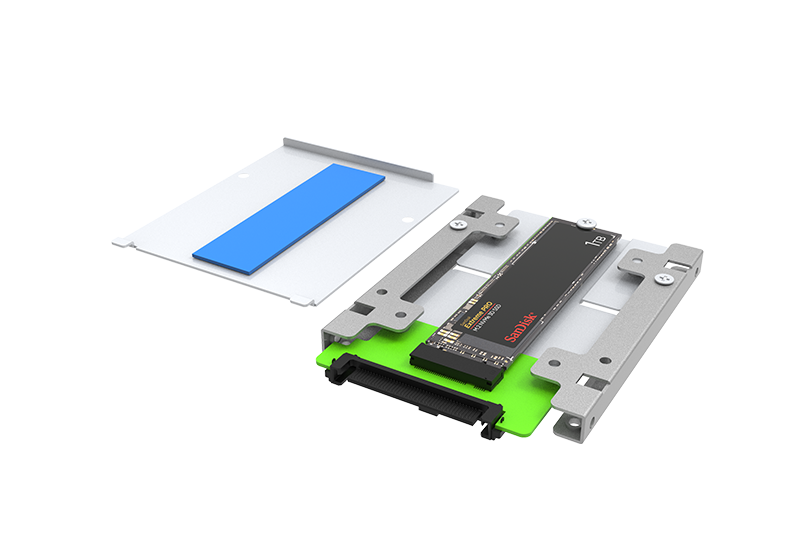
● Supports PCIe M.2 NVMe SSDs: 2242 / 2260 / 2280
● Tool-free trays for fast installation and drive changes
● Drive status LEDs for activity and error indication
● For best data safety, eject the volume before removing a drive

3. Power, Cooling & Protection
● USB-C PD power input (5V / 3A) for stable operation
● Power-status LED alerts when input power is insufficient

● 30mm cooling fan with HI/LOW speed control
● Over-temperature and fan-failure alarms with buzzer mute (visual warnings remain active)

4. Mobile Offline Backup
● Easy Data Vault supports offline photo/video backup & restore to external storage on USB-C iPhone/iPad (no cloud/internet)

Buying Guide
|
Decision area |
What to check |
Why it matters |
Practical buying tip |
|---|---|---|---|
|
Host interface |
USB-C USB 3.2 Gen 2 (10Gbps) vs Gen 2x2 (20Gbps); Thunderbolt™ 3/4 host use (as USB device) |
Determines peak link speed. USB 3.2 defines 5/10/20Gbps tiers. |
If you have mixed laptops/desktops, prioritize USB 20Gbps (Gen 2x2) but confirm your host PC actually supports 20Gbps (many USB-C ports are limited to 10Gbps). |
|
Thunderbolt™ 3/4 compatibility |
Can it plug into TB3/TB4 ports ? |
Thunderbolt ports are designed to accept USB peripherals; performance follows USB negotiation. |
Treat TB3/TB4 as a universal USB-C port for connectivity, but expect USB speeds unless the device is a true Thunderbolt device. |
|
RAID support |
Hardware RAID levels (RAID 0/1/5/10 + JBOD/BIG) vs JBOD-only |
Hardware RAID provides OS-independent protection and predictable performance. |
If you need fault tolerance, choose the SR4-B32 (RAID 5). JBOD-only models (like ST4-B32) are for expansion, not data protection. |
|
Capacity scaling (4-bay) |
Drive types (HDD/SSD), and max capacity |
4-bay arrays scale to tens of TBs depending on drive size and RAID level |
For the best value per TB, HDD RAID 5 is typical. For maximum performance, use SSDs with RAID 0. |
|
Thermal design |
Fan size & Chassis material |
Sustains performance and drive longevity under long writes/RAID rebuilds |
Prefer large fans (80mm+) and metal chassis for quieter, cooler continuous operation |
|
OS compatibility |
Windows / macOS / Linux support; any vendor utility dependencies |
Avoid workflow friction |
If a Windows tool exists, assume it is monitoring, unless explicitly documented for configuration |
|
Target use case |
Post, backup, shuttle, lab datasets |
Drives the “right RAID + right port” decision |
Map the workflow first (required RAID + required host port tier) |
Applications
● Content Creation & Video Editing: fast media ingest, cache/scratch separation, rapid exports
● Data Backup & Archiving: two independent volumes for flexible organization
● Professional Workstations (CAD/3D): reduces load times and improves iteration speed
● Edge / Field Work: durable metal build + active thermal control
● AI / ML Development: high-throughput dataset staging and fast experiment cycles


Frequently Asked Questions
Q1: Why Choose US2-B4?
|
Decision Area |
US2-B4 Advantage |
Why It Matters |
Buying Tip |
|---|---|---|---|
|
Dual-Bay Flexibility |
Two independent NVMe volumes (JBOD) |
Separate scratch vs archive, clean project separation |
Use one SSD for “active work”, one for “deliverables/backup” |
|
Speed |
USB4.0/40Gbps |
Faster ingest/exports for large media & datasets |
Pair with certified high-speed USB-C/USB4.0/TB cable |
|
Ease of Service |
Tool-free trays + status LEDs |
Faster swaps, fewer mistakes |
Always eject before removal |
|
Sustained Reliability |
Active cooling + alarms |
More stable performance under load |
Use HI fan for long renders/training jobs |
|
Mobile Workflow |
Easy Data Vault offline backup |
Field backup without cloud dependency |
Ideal for iPhone/iPad USB-C workflows |
Q2: How do I choose US2-B4 vs UR2-B32?
If you need RAID (mirror/redundancy or stripe performance), choose UR2-B32. If you need maximum interface speed and two independent NVMe volumes, choose US2-B4.
|
Feature / Aspect |
UR2-B32 |
US2-B4 |
|---|---|---|
|
Positioning |
Dual NVMe enclosure with USB 3.2 Gen 2x2 + RAID |
Dual NVMe enclosure with USB4.0/40Gbps + JBOD |
|
Interface |
USB 3.2 Gen 2x2 (20Gbps) |
USB4.0 40Gbps |
|
RAID Modes |
RAID 0 / RAID 1 / BIG / JBOD |
JBOD only (two independent volumes) |
|
Best For |
Users who want redundancy (RAID 1) or RAID performance |
Creators/pros prioritizing speed + clean separation |
|
iPhone/iPad Workflow |
Easy Data Vault supported |
Easy Data Vault supported |
Q3: What SSDs does the US2-B4 support?
PCIe M.2 NVMe SSDs in 2242 / 2260 / 2280 form factors. M.2 SATA SSDs are not supported.
Q4: Does US2-B4 support RAID?
No. JBOD only—each SSD appears as a separate drive for maximum flexibility.
Q5: What speed should I expect?
Up to USB4.0 40Gbps link speed on capable hosts; real-world throughput depends on host, cable, and SSD performance.
Q6: Can I change SSDs while powered on?
The trays are designed for fast swaps. For best data safety, eject the volume before removing a drive.
Q7: Why does it need external power?
US2-B4 uses USB-C PD (5V/3A) input to keep operation stable under dual-NVMe and sustained workloads.
Q8: What happens if it overheats or the fan fails?
The enclosure monitors temperature/fan status and triggers alarm LED + buzzer for immediate warning.
Q9: Can I mute the buzzer?
Yes. Mute disables sound while visual alerts remain active until resolved.
Q10: Does it support iPhone/iPad offline backup?
Yes—using Easy Data Vault, you can back up photos/videos to external storage on USB-C iPhone/iPad without cloud/internet.
Q11: What are the best use cases?
High-speed ingest/edit/export, dual-volume project organization, workstation scratch + archive, and mobile/field offline backup.
Performance test result for reference. The test result will vary depend on the test environment.
Product View

Specification
| Model No | US2-B4 |
|---|---|
| Interfaces | USB 4.0 (up to 40Gbps) Compatible with Thunderbolt 3/4/5 |
| Supported Drives | 2 x M.2 NVMe SSD (2242/2260/2280) |
| Connectivity Compatibility | USB-C for PC and Mac |
| Certification | CE / FCC |
| Storage Mode | JBOD - Independent Mode |
| Hot-Plug Tray | Tool-free removable SSD trays (hot-plug functionality is platform dependent) |
| Operating System Support | Windows 7 or later, macOS 10.10 or later, Linux |
| Cooling System | 30mm Low noise fan; Aluminum chassis with active cooling |
| Power Input | USB-C PD 5V/3A (via white Type-C port) Dedicated power input (not for data) |
| Dimensions | Height: 41mm Width: 97mm Depth: 165.3 mm |
| packaging | 10 pcs per carton |
| Included Accessories | * 1 x US2-B4 * 1 x USB 4.0 Type-C to Type-C Cable (Black) * 1 x USB Type-C to Type-C Cable (White, Power only) * 1 x Accessory kit * 1 x Quick Installation Guide |
Related Products
|
UBOX Mini |
UR2-B32 |
|
|
|











RaidonTek.com (stardom.com.tw) uses cookies to improve site functionality and your overall experience by storing necessary information for service delivery. By continuing, you consent to our use of cookies as detailed in our Privacy Policy, which provides more information about this usage. (Accept cookies to continue browsing the website)