
- About Us
- PRODUCTS
- SUPPORT
- Sales Guide
- LANGUAGE
 English-US
 Chinese Traditional
 Japanese
 Korean
 Russian
 German
 French
 Chinese Simplified
 Spanish
 Italian
ST8R-B32
ST8R-B32 – 8-Bay USB-C Dual Hardware RAID Storage
Two RAID Workflows. One Professional DAS.
One Enclosure. One USB-C Connection. Two RAID Groups. Up to 240TB Raw Capacity.
ST8R-B32 – 8-Bay USB-C Dual Hardware RAID Storage
Two RAID Workflows. One Professional DAS.
One Enclosure. One USB-C Connection. Two RAID Groups. Up to 240TB Raw Capacity.
Overview
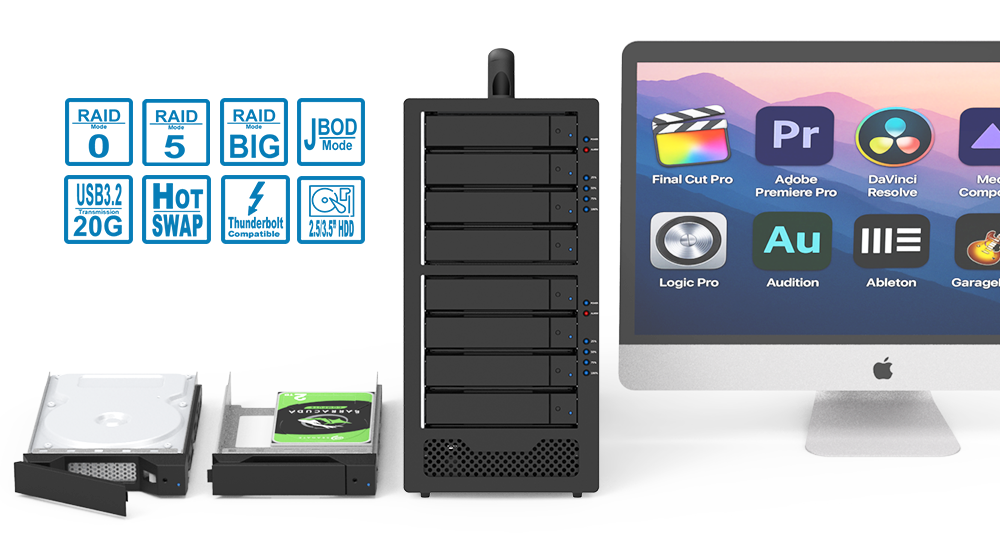
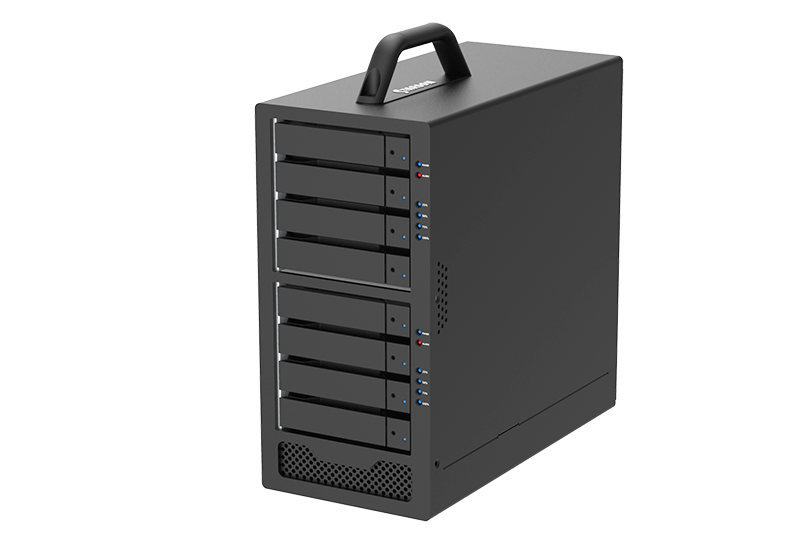
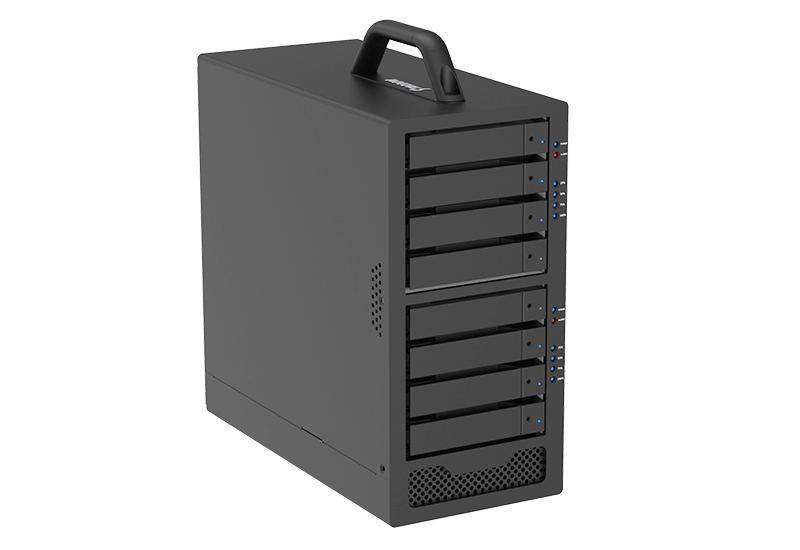
The ST8R-B32 is an 8-bay USB-C DAS with two independent 4-drive hardware RAID groups, allowing separate storage workflows within a single enclosure. Each group supports RAID 0, RAID 5, BIG, or JBOD, enabling active and protected storage to operate side by side. Dedicated hardware RAID controllers manage storage operations directly within the enclosure, eliminating dependence on host-based RAID software.
Key Highlights
|
8 |
2 |
1 |
Up to 240TB |
|---|---|---|---|
|
Drive Bays |
Independent 4-Drive RAID Groups |
USB-C Host Connection |
Raw Capacity |
Why Use One ST8R-B32 Instead of Two 4-Bay DAS Systems?
|
Feature |
Two Separate 4-Bay DAS Systems |
ST8R-B32 |
|---|---|---|
|
Enclosures |
2 |
1 |
|
Power Supplies |
2 |
1 |
|
Host Connections |
Typically 2 |
1 |
|
RAID Environments |
2 |
2 |
|
Monitoring |
Managed as two devices |
Both controllers monitored through one Windows utility |
|
Installation |
Two systems to connect and position |
One integrated system |
|
Best Fit |
Greater physical separation |
Simplified dual-workflow storage |
Why ST8R-B32?
● Separate Active and Protected Storage
Keep performance-focused and protected data environments independent.
● Flexible RAID Per Workflow
Configure G1 and G2 independently as RAID 0, RAID 5, BIG, or JBOD.
● Reduce Hardware Footprint
Run two storage workflows without purchasing a second DAS.
● Single-Cable Simplicity
Access both RAID groups through one USB-C connection.
Two RAID Workflows. One Professional DAS.
The ST8R-B32 lets creative professionals run active and protected storage side by side without adding a second enclosure.
One enclosure.
One USB-C connection.
Two independent RAID workflows.
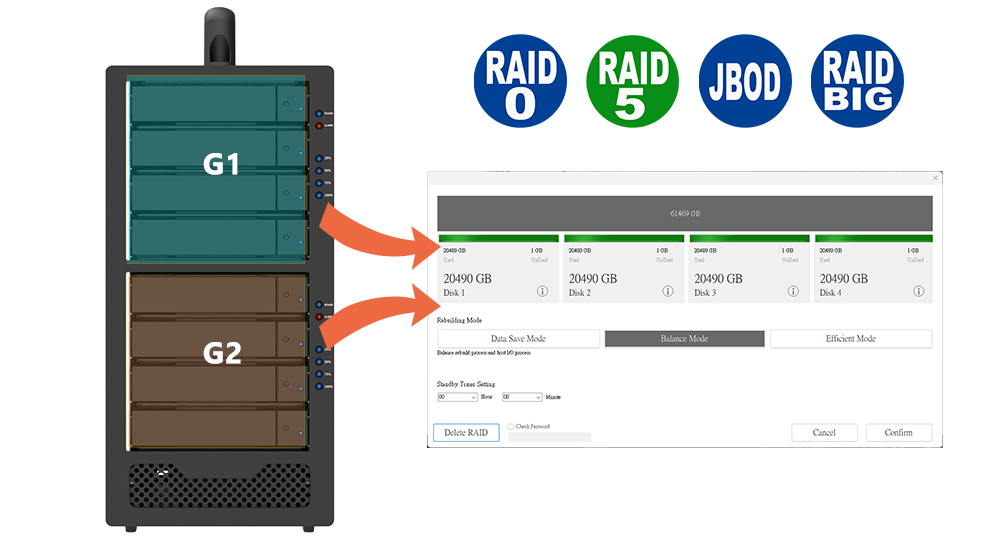
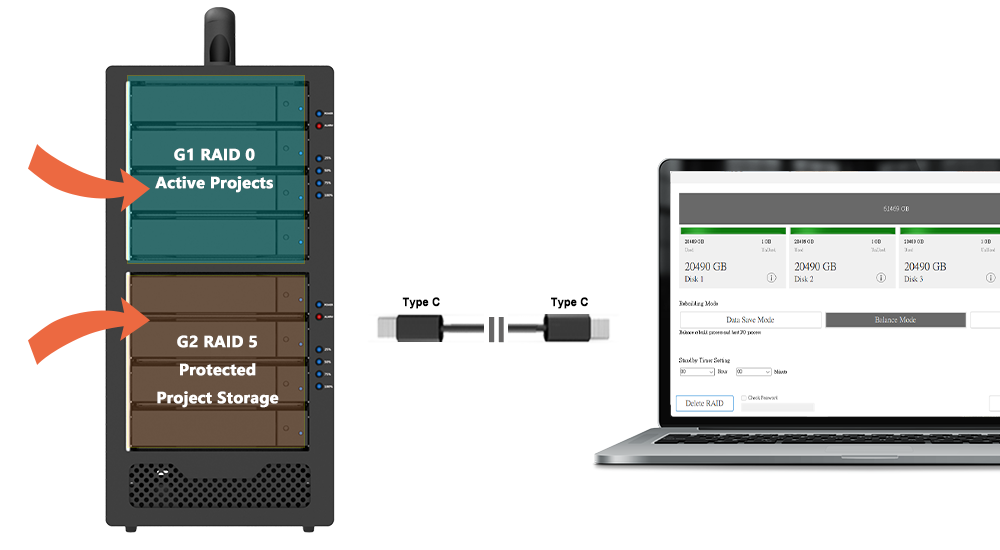
Dual RAID Architecture
|
RAID Group 1 |
RAID Group 2 |
|---|---|
|
Drive 1 + Drive 2 + Drive 3 + Drive 4 |
Drive 5 + Drive 6 + Drive 7 + Drive 8 |
|
RAID 0 |
RAID 5 |
|
Active Projects |
Protected Project Storage |
1. One System. Two Independent Storage Groups.
2. G1 and G2 can each be independently configured as RAID 0, RAID 5, BIG, or JBOD.
3. Both groups are accessible through the same USB-C connection.
Key Features
1. Dual Independent Hardware RAID Controllers
Two independent hardware RAID controllers allow you to configure and manage two separate RAID arrays simultaneously in a single 8-bay enclosure.
2. Flexible RAID Configurations
Supports RAID 0, RAID 5, BIG, and JBOD, providing flexible options for high-speed performance, data protection, and expanded storage capacity.
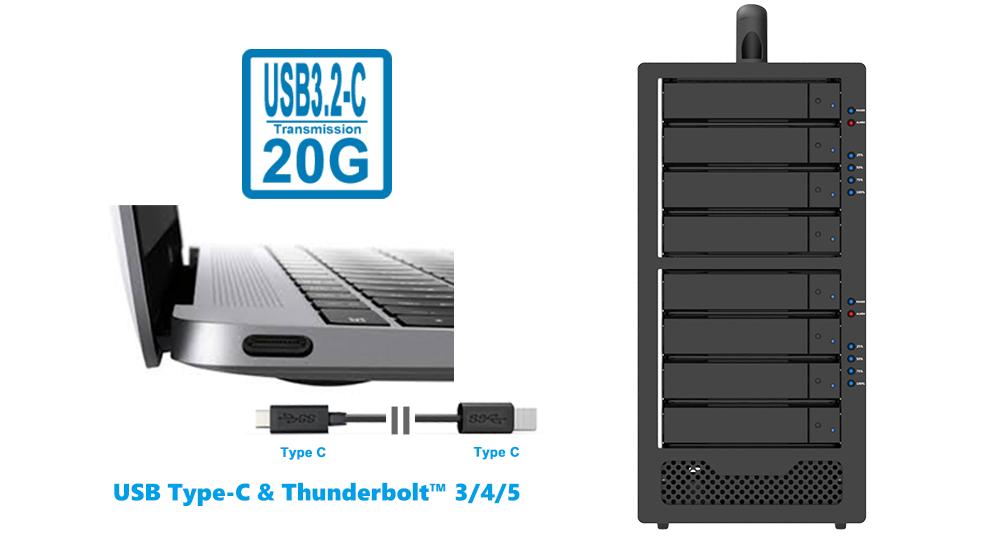
3. USB-C Interface with Up to 20Gb/s Aggregate Bandwidth
USB 3.2 Gen 2x2 provides up to 20Gb/s of aggregate bandwidth shared by both RAID groups.
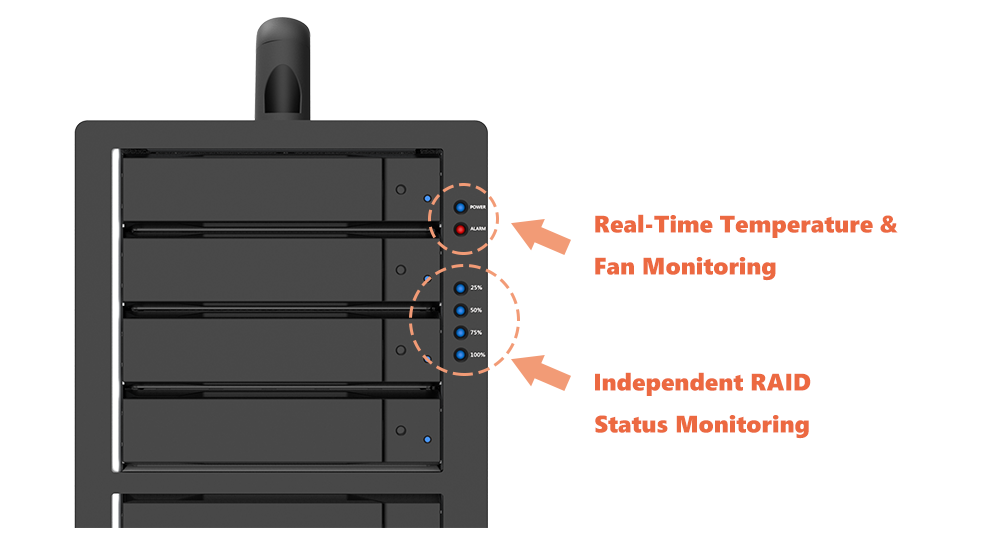
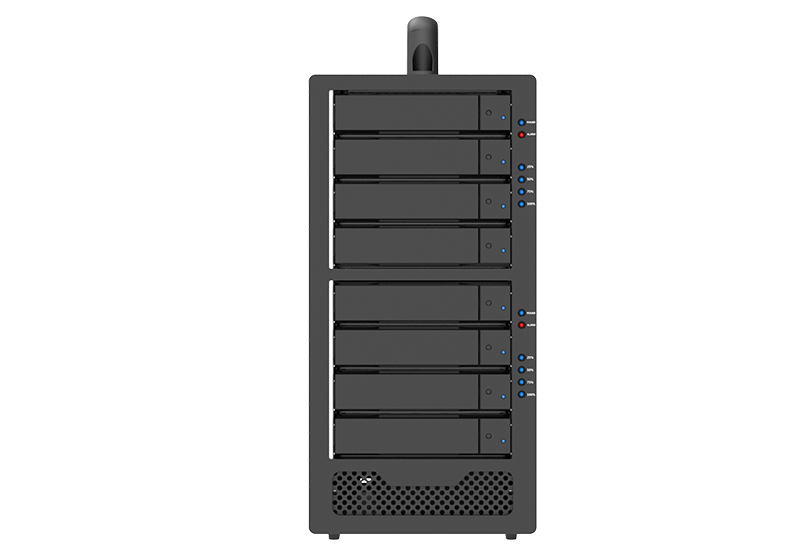
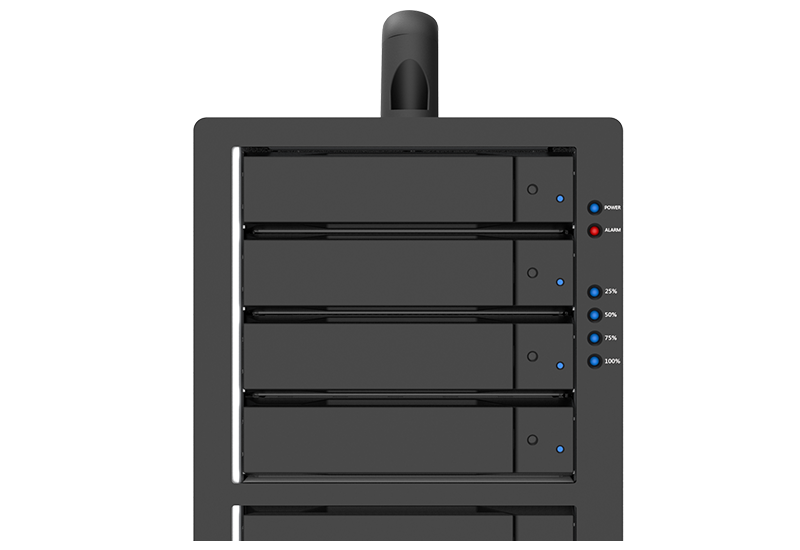
4. Independent RAID Status Monitoring
Dedicated LED indicators for each controller provide clear status information for Drive Access, Rebuilding, Drive Failure, and Rebuilding Progress (25% / 50% / 75% / 100%).
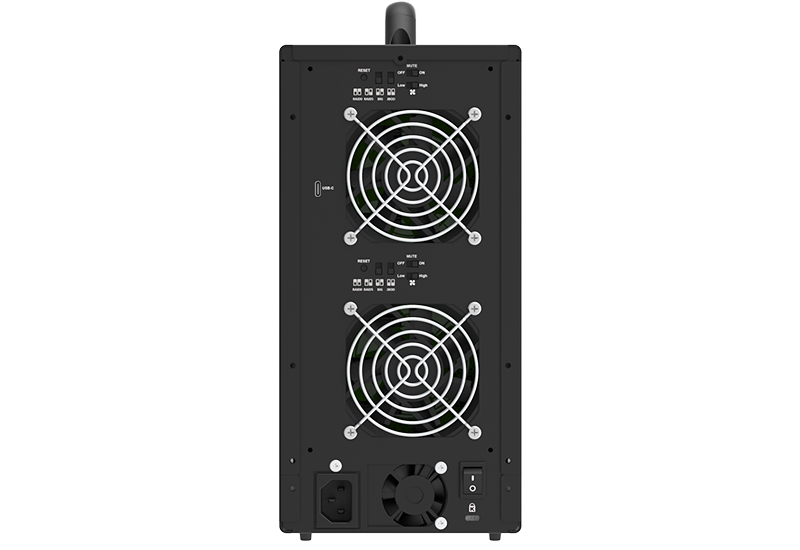
5. Real-Time Temperature & Fan Monitoring
Temperature monitoring and fan-failure detection with LED indicators and audible buzzer alerts help support stable system operation.
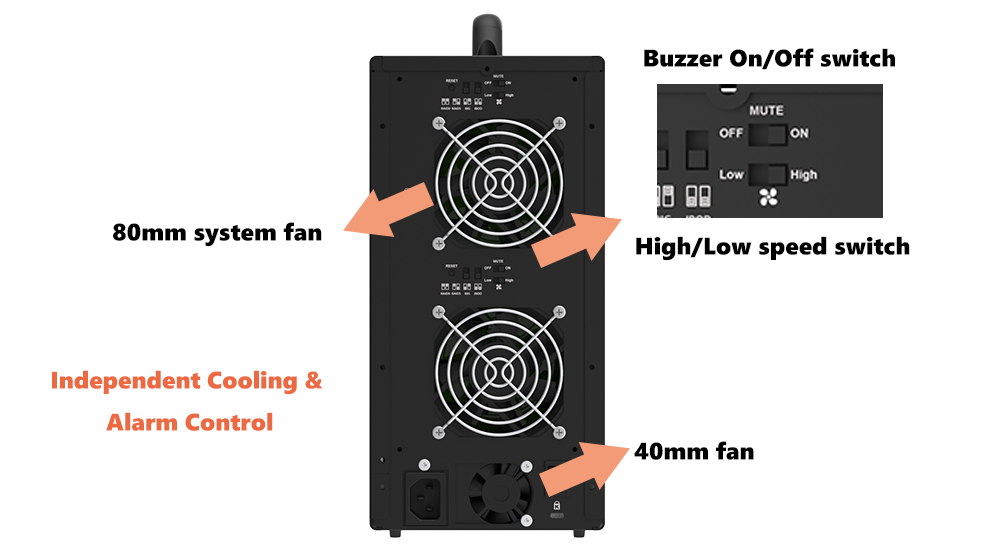
6. Independent Cooling & Alarm Control
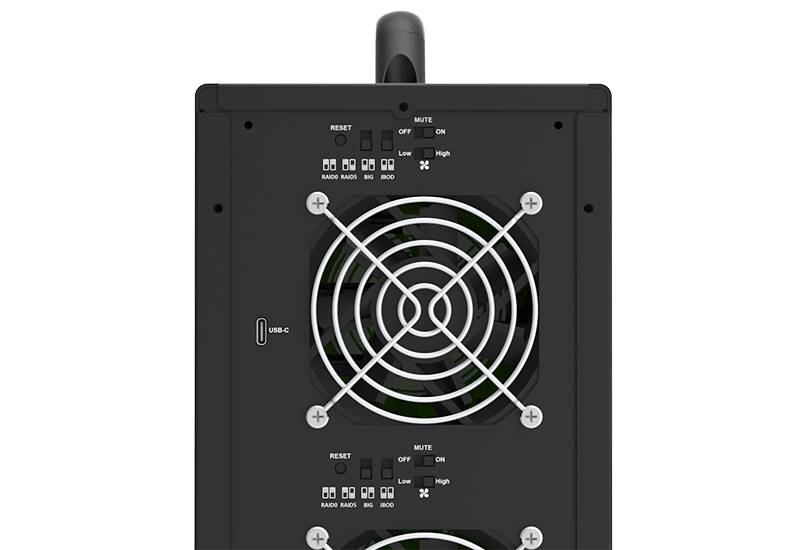
Each RAID group has a dedicated 80mm system fan with independent High/Low speed control and its own Buzzer On/Off switch. A separate 40mm fan provides dedicated power-supply cooling.
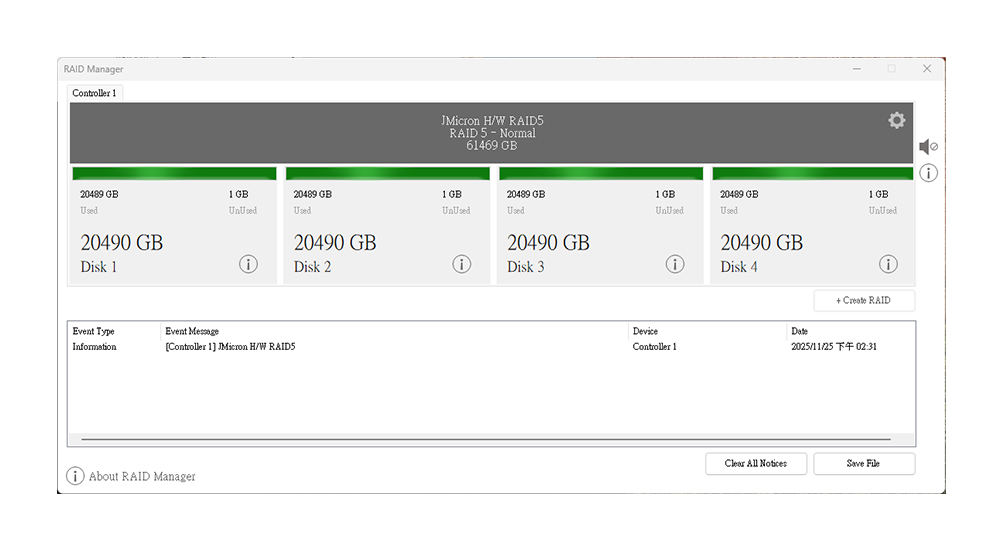
7. Windows GUI Monitoring Utility
Monitor both RAID controllers—including drive status, system temperature, fan operation, failure alerts, and rebuild progress—through a single graphical interface on Windows. Storage access is supported on Windows, macOS, and Linux.
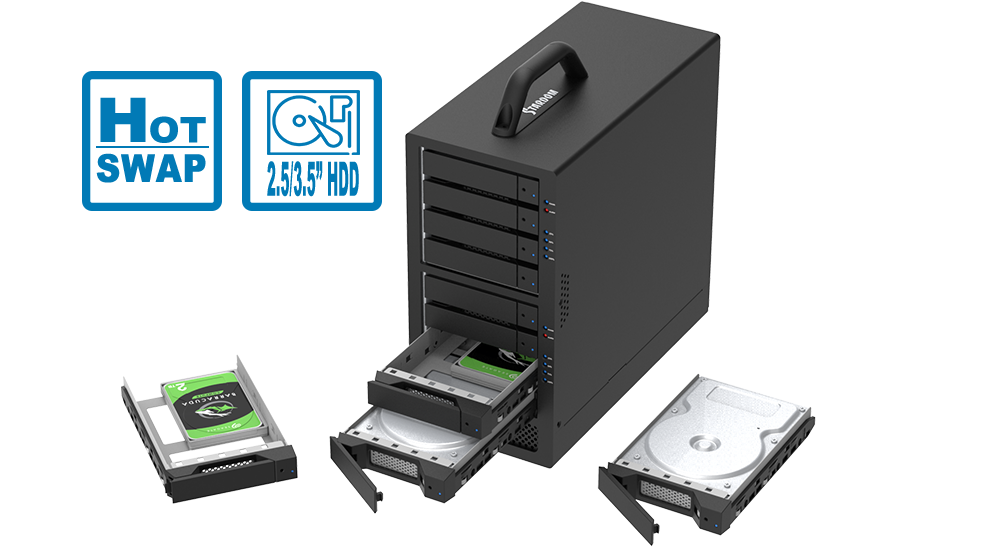
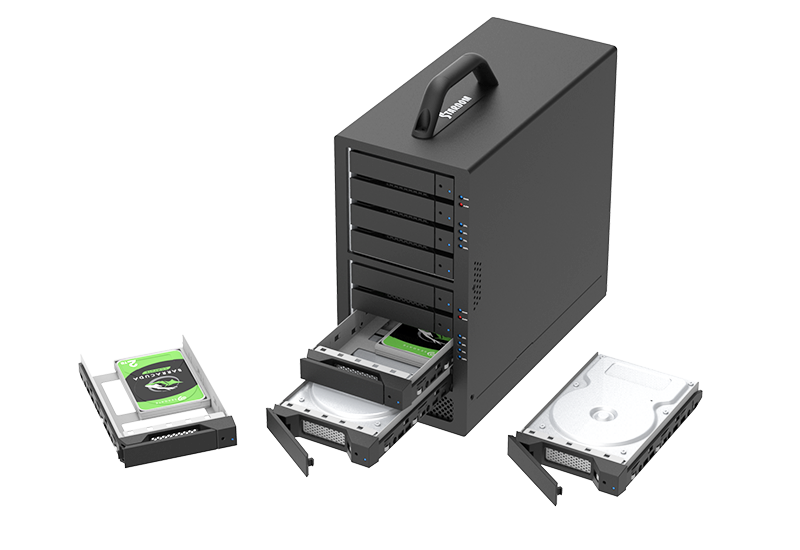
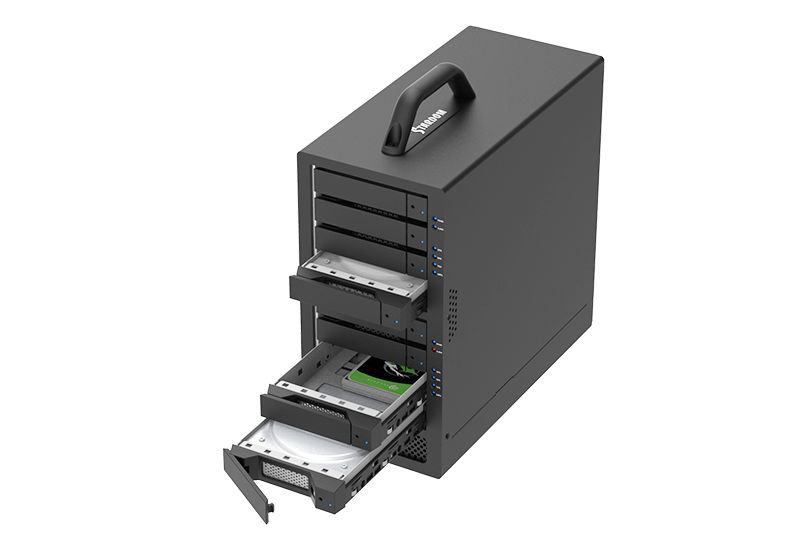
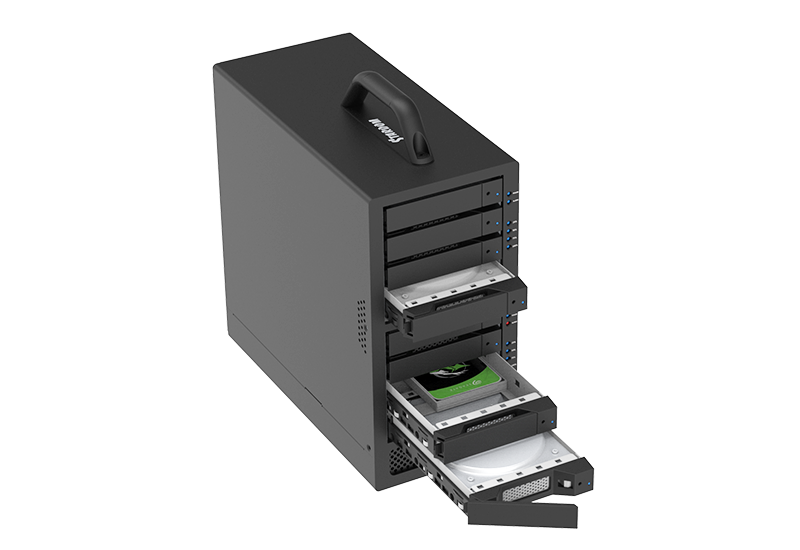
8. Hot-Swappable Lockable Drive Trays
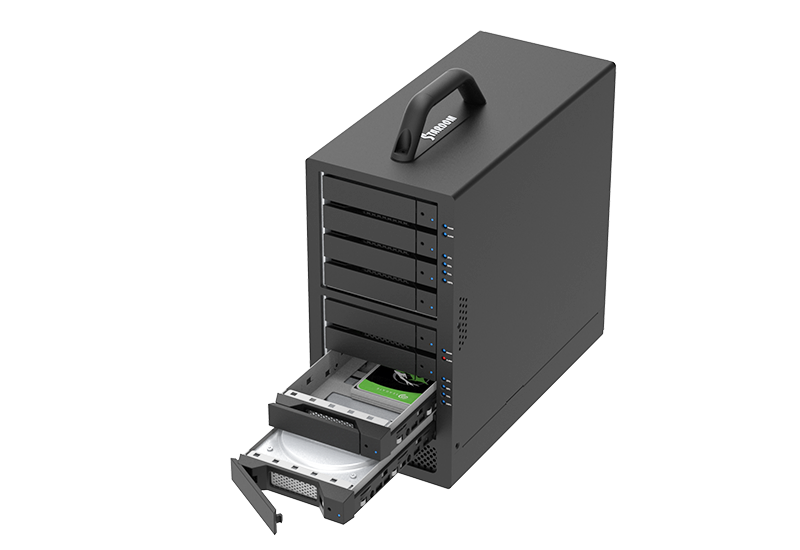
Supports hot-swappable 3.5-inch HDDs and 2.5-inch HDDs/SSDs with lockable trays. The pin-key lock helps reduce the risk of accidental drive removal during operation.
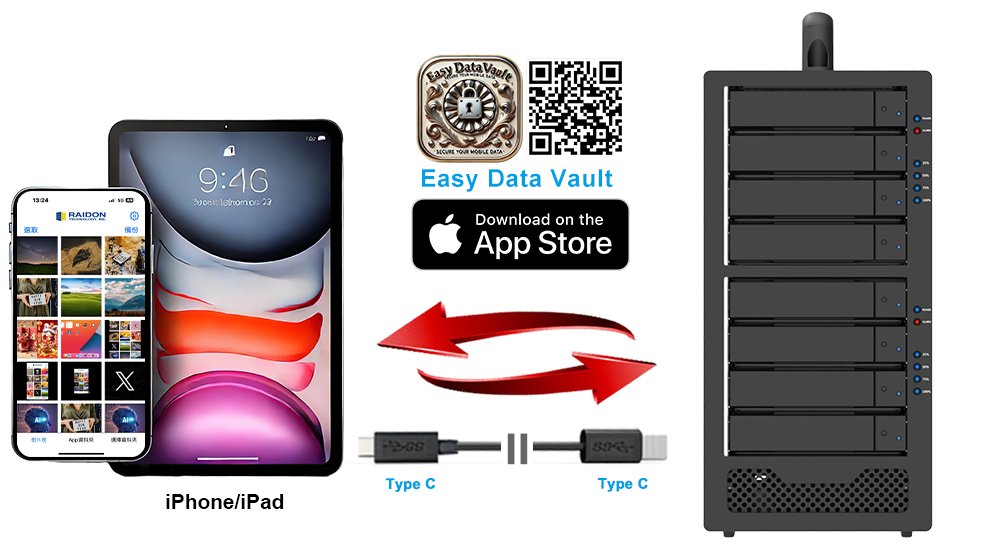
9. Mobile Backup with Easy Data Vault
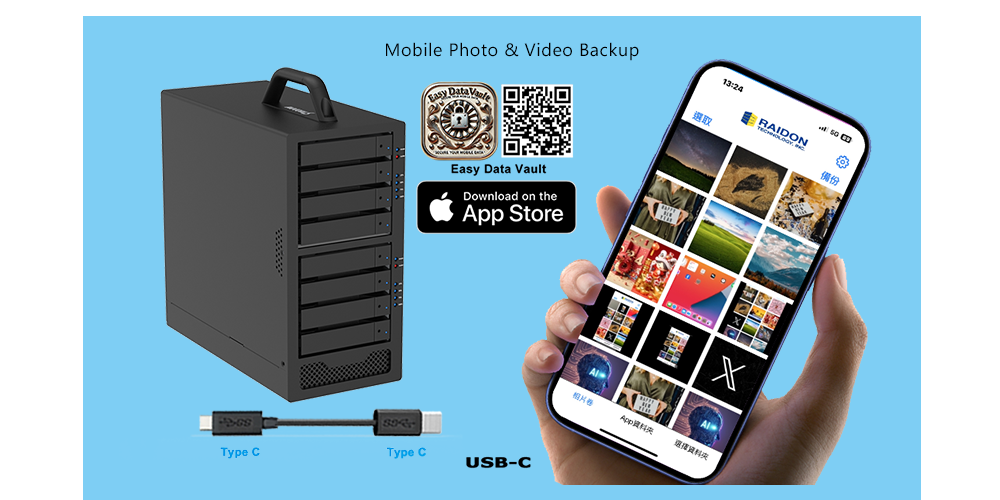
Back up photos and videos directly from compatible USB-C iPhone and iPad devices to high-capacity local storage.
Choosing the Right RAID Mode: A Use-Case Guide
|
RAID Mode |
Key Feature |
Ideal For |
|---|---|---|
|
RAID 0 |
Speed Priority |
Editing, scratch storage, and fast data transfer. No fault tolerance. |
|
RAID 5 |
Performance & Protection |
Important data, project files, and long-term storage. Protects against a single-drive failure. |
|
BIG |
Large Capacity |
Combining the four drives within one RAID group into a single large storage volume. |
|
JBOD |
Independent Drives |
Individual drive management, testing, replacement, and data transfer. |
RAID is not a substitute for backup. Maintain a separate backup of important data.
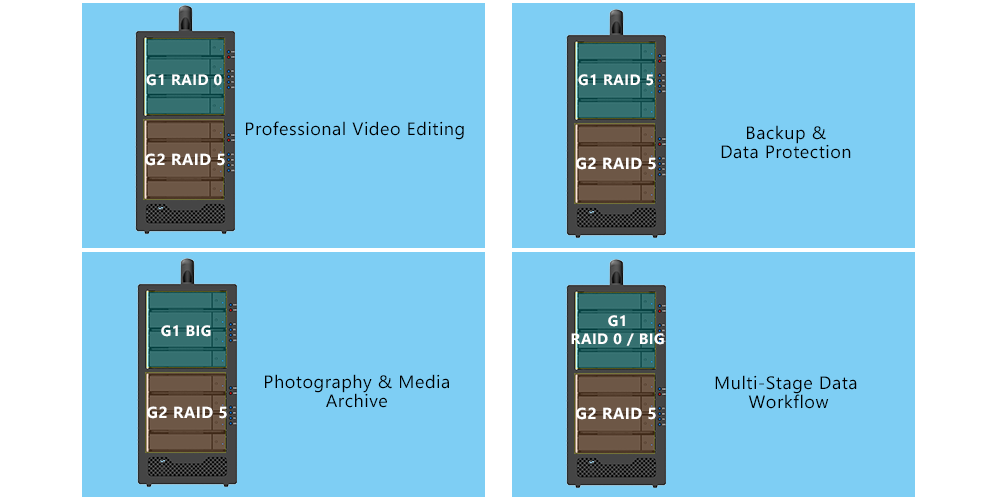
Common Deployment Applications
1. Professional Video Editing
G1 — RAID 0: High-Speed Editing Workspace
G2 — RAID 5: Protected Project Storage
Handle demanding video editing workloads while keeping completed and important project data protected in the same enclosure.
2. Photography & Media Archive
G1 — BIG: Photo & Video Library
G2 — RAID 5: Protected Media Archive
Use one storage group for high-capacity media storage and the other for protected long-term archiving, keeping active and archived content independently managed.
3. Backup & Data Protection
G1 — RAID 5: Primary Local Storage
G2 — RAID 5: Secondary Local Copy
Maintain two separately managed RAID 5 environments in one enclosure for operational convenience. For critical data, keep another backup on a separate device or at another location.
4. Multi-Stage Data Workflow
G1 — RAID 0 / BIG: Active Working Data
G2 — RAID 5: Protected Data
Separate frequently accessed working data from important or completed data, allowing each RAID group to be configured according to its specific storage and protection needs.
5. Mobile Photo & Video Backup
Use Easy Data Vault to back up photos and videos directly from compatible USB-C iPhone and iPad devices to the ST8R-B32, providing high-capacity local storage for media backup and organization.
ST8R-B32 vs. a Conventional Single-Array 8-Bay DAS
|
Feature |
Conventional Single-Array 8-Bay DAS |
ST8R-B32 |
|
RAID Architecture |
One 8-drive RAID array |
Two independent 4-drive RAID groups |
|
RAID Configuration |
One mode applies to the complete array |
G1 and G2 can use different modes |
|
Storage Environments |
One unified RAID environment |
Two separately managed environments |
|
Workflow Separation |
Workloads share the same RAID configuration |
Active and protected storage can use different configurations |
|
Host Access |
One primary storage environment |
Both RAID groups are accessible through one USB-C connection |
|
Best Fit |
One large storage pool |
Two storage workflows in one enclosure |
A conventional 8-drive RAID 5 array may provide greater usable-capacity efficiency from one storage pool.
The ST8R-B32 is designed for workflow separation and independent RAID configuration rather than the creation of one maximum-capacity 8-drive array.
RAID Mode Switching Procedure
Changing RAID modes may erase or make existing data inaccessible. Back up all important data and follow the latest product manual before changing modes.
Frequently Asked Questions (FAQ)
Q1. What RAID modes are supported?
A: Each 4-drive RAID group supports RAID 0, RAID 5, BIG, and JBOD.
Q2. Does ST8R-B32 support RAID 5?
A: Yes. G1 and G2 can each be independently configured as RAID 5, providing protection against one drive failure within the selected 4-drive group.
Q3. Can G1 and G2 use different RAID modes?
A: Yes. G1 and G2 can be configured independently. For example, G1 can use RAID 0 while G2 uses RAID 5 for protected project storage.
Q4. Can both RAID groups be accessed simultaneously?
A: Yes. Both groups are accessible through the same USB-C host connection and appear as separate storage environments or individual drives, depending on the selected RAID modes.
Q5. What is the advantage of having two independent RAID groups?
A: Two independent RAID groups allow you to create different storage environments and workflows in one enclosure. For example, one group can prioritize performance for active projects, while the other prioritizes drive-failure protection for important project data.
Q6. Why doesn’t the ST8R-B32 support a single 8-drive RAID 5 array?
A: The ST8R-B32 is purpose-built for workflow separation rather than one large RAID environment.
Drives 1–4 form Group 1, while Drives 5–8 form Group 2. Each group can be independently configured as RAID 0, RAID 5, BIG, or JBOD.
The two groups cannot be combined into a single 8-drive hardware RAID array. If maximum usable capacity from one RAID 5 storage pool is the primary requirement, a conventional single-array 8-bay RAID system may be a better fit.
Q7. What is the maximum capacity?
A: Eight supported 30TB drives provide up to 240TB of total raw capacity. Actual usable capacity depends on the RAID mode, drive capacities, formatting, file system, and operating system.
Q8. Does USB-C automatically provide 20Gb/s?
A: No. The host port must support USB 3.2 Gen 2x2 to provide interface bandwidth up to 20Gb/s. Host systems without USB 3.2 Gen 2x2 support operate at the highest mutually supported USB speed. Actual performance also depends on the cable, installed drives, RAID mode, file system, workload, and system configuration. Mac systems without USB 3.2 Gen 2x2 support will typically operate at USB speeds up to 10Gb/s.
Q9. Does each RAID group receive 20Gb/s of bandwidth?
A: No. The USB 3.2 Gen 2x2 connection provides up to 20Gb/s of aggregate host-interface bandwidth shared by G1 and G2. It is not 20Gb/s per group. Performance may change when both groups are accessed simultaneously.
Q10. Can drives with different capacities be used?
A: Yes, but RAID capacity is calculated using the smallest drive within each group.
Matched drives of the same model and capacity are recommended for more predictable performance and compatibility.
Q11. How are drives displayed in JBOD mode?
A: In JBOD mode, each drive in the selected 4-drive group appears as an independent disk in the operating system. If both G1 and G2 are configured as JBOD, up to eight individual disks may be displayed.
Q12. Does RAID 5 replace backup?
A: No. RAID 5 protects against one drive failure within its group, but it does not protect against deletion, corruption, malware, enclosure failure, theft, physical damage, or multiple drive failures.
Q13. Can Easy Data Vault recognize both RAID groups?
A: Yes. On compatible USB-C iPhone and iPad devices, Easy Data Vault can access supported exFAT-formatted storage volumes presented by both RAID groups.
Q14. Can all drive bays use SSDs?
A: Yes. Every drive bay supports qualified 2.5-inch SATA SSDs, allowing the system to be configured entirely with SSDs. SSDs and HDDs can also be assigned to separate RAID groups—for example, SSDs in G1 and HDDs in G2. Within each RAID group, drives of the same model and capacity are recommended for more predictable performance and compatibility.
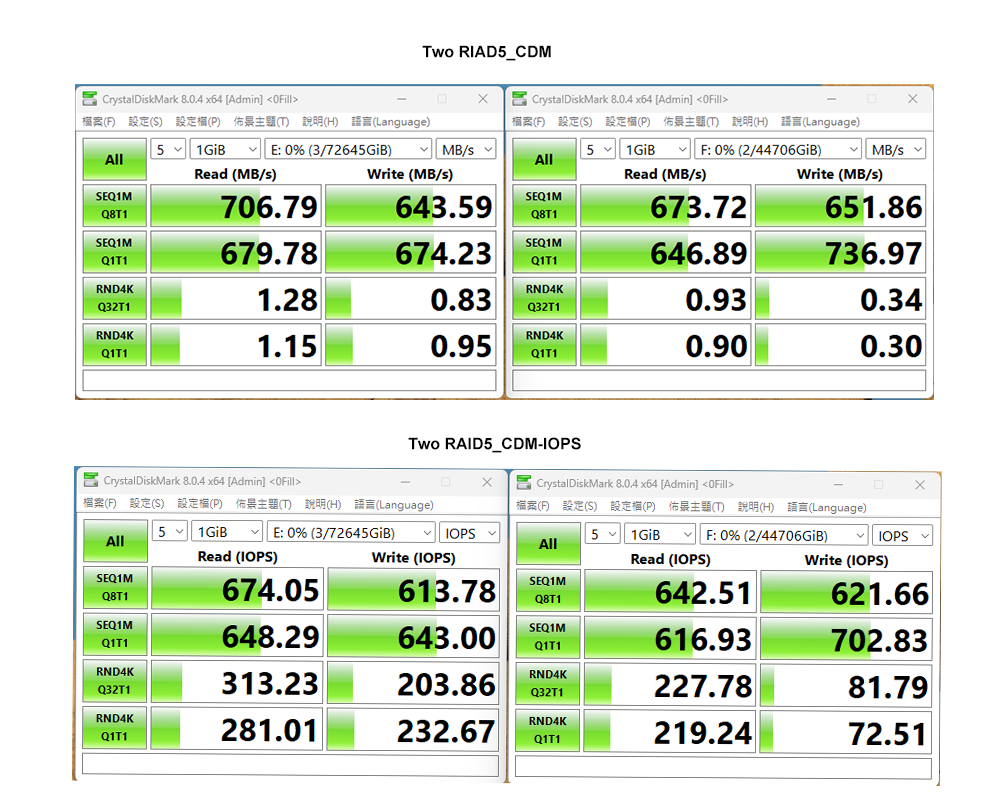
Performance test result for reference. The test result will vary depend on the test environment.
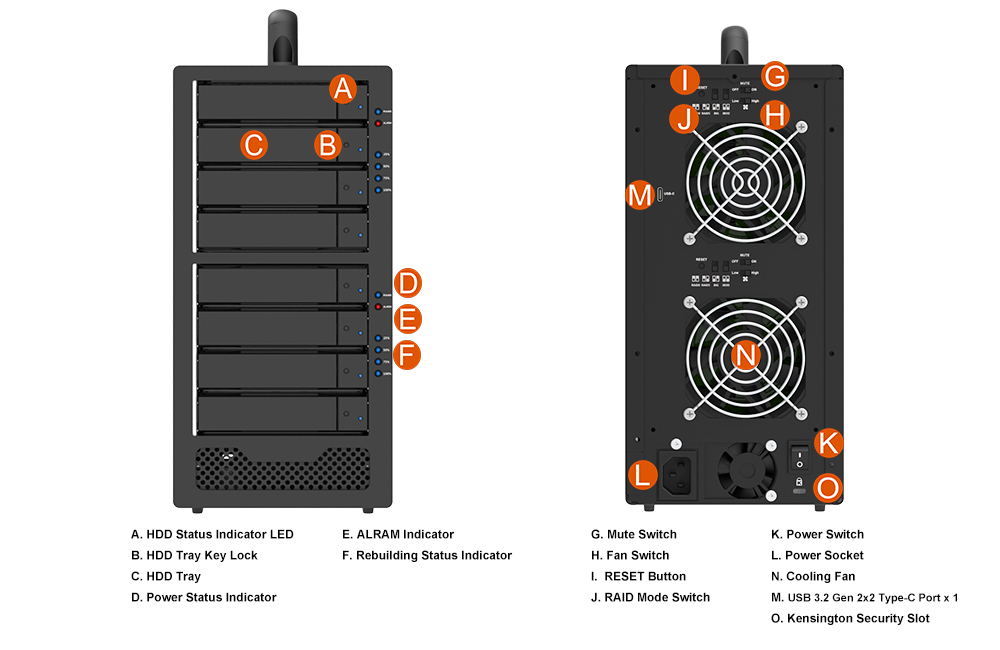
Product View
Specification
| Model No | ST8R-B32 |
|---|---|
| Host Interface | USB 3.2 Gen 2x2 Type-C, up to 20Gb/s (Aggregate) |
| Supported Drives | 8 × 3.5-inch / 2.5-inch SATA HDD/SSD |
| Drive Interface | SATA III 6Gb/s |
| Maximum Drive Capacity | Up to 30TB per drive |
| Maximum Raw Capacity | Up to 240TB* |
| RAID Architecture | 2 independent 4-drive hardware RAID groups |
| RAID Modes | RAID 0 / 5 / BIG / JBOD per group |
| OS Compatibility | Windows / macOS / Linux |
| System Cooling | 2 × 80mm system fans, each with independent High/Low speed control |
| Alarm Control | 2 × Buzzer On/Off switches, one per RAID group |
| Physical Security | Lockable trays / Kensington Security Slot |
| Power Supply | Built-in 250W, AC 100–240V, with dedicated 40mm cooling fan |
| Dimensions | 295 × 140 × 280 mm |
| Weight | Approx. 2.4 kg, excluding drives |
| Compliance | CE / FCC / RoHS |
| Included Accessories | 1 x USB-C to USB-C cable 1 x Power cord 1 x Drive screws and keys 1 x Quick Installation Guide |
| Note | *Actual usable capacity depends on RAID mode, drive capacity, formatting, and operating system. |
Related Products
|
i310-B31+ |
ST2-B31 |
ST4R-B31 |
|
|
|
|
| Product Name | Brand | HD Type | HD Category | Model Number | Capacity | Note |
|---|---|---|---|---|---|---|
| ST8R-B32 | Seagate | 3.5" HDD | Ironwolf Pro | ST16000NE000 | 16TB | |
| ST8R-B32 | Seagate | 3.5" HDD | EXOS X22 | ST22000NM001E | 22TB | |
| ST8R-B32 | WD | 3.5" HDD | DC HC590 | WUH722626ALE6L4 | 26TB | |
| ST8R-B32 | Kingston | 2.5" SSD | SA400S72 | 240GB | ||
| ST8R-B32 | Kingston | 2.5" SSD | SKC400 | 512GB | ||
| ST8R-B32 | Kingston | 2.5" SSD | Hyper X | 480GB | ||
| ST8R-B32 | KIOXIA | 2.5" SSD | EXCERIA | 960GB | ||
| ST8R-B32 | Synology | 2.5" SSD | SAT5200 | 480GB | ||
| ST8R-B32 | TOOMORE | 2.5" SSD | TP100 | 480GB | ||
| ST8R-B32 | Crucial | 2.5" SSD | BX500 | 240GB | ||
| ST8R-B32 | TCELL | 2.5" SSD | TT550 | 480GB | ||
| ST8R-B32 | KLEVV | 2.5" SSD | N610 | 512GB | ||
| ST8R-B32 | OWC | 2.5" SSD | Mercury Extreme Pro 6G | 240GB | ||
| ST8R-B32 | TIGO | 2.5" SSD | S300 | 120GB | ||
| ST8R-B32 | Samsung | 2.5" SSD | 860 QVD | 4TB | ||
| ST8R-B32 | Samsung | 2.5" SSD | 860 PRO | 1TB | ||
| ST8R-B32 | Samsung | 2.5" SSD | 870 EVO | 500GB | ||
| ST8R-B32 | Intel SSD | 2.5" SSD | 730 Series | 480GB | ||
| ST8R-B32 | Intel SSD | 2.5" SSD | 510 Series | 512GB | ||
| ST8R-B32 | PQI | 2.5" SSD | S511 | 120GB | ||
| ST8R-B32 | OCZ SOLID3 | 2.5" SSD | SOLID3 | 120GB | ||
| ST8R-B32 | SKHYNIX | 2.5" SSD | S31 | 500GB | ||
| ST8R-B32 | FUJTISU | 2.5" SSD | F500S | 480GB | ||
| ST8R-B32 | ANACONDA | 2.5" SSD | QS960 | 960GB | ||
| ST8R-B32 | UMAX | 2.5" SSD | S330 | 480GB | ||
| ST8R-B32 | Plextor | 2.5" SSD | PX-512S3C | 512GB | ||
| ST8R-B32 | WD | 3.5" HDD | WUH722424ALE6L4 | 24TB | ||
| ST8R-B32 | WD | 3.5" HDD | WD221KRYZ | 22TB | ||
| ST8R-B32 | WD | 3.5" HDD | WUH722222ALE6L4 | 22TB | ||
| ST8R-B32 | WD | 3.5" HDD | WD180PURZ | 18TB | ||
| ST8R-B32 | WD | 3.5" HDD | WD161KRYZ | 16TB | ||
| ST8R-B32 | WD | 3.5" HDD | WUH721414ALE64 | 14TB | ||
| ST8R-B32 | WD | 3.5" HDD | WD120EFBX | 12TB | ||
| ST8R-B32 | WD | 3.5" HDD | WD100PURZ-85W86Y0 | 10TB | ||
| ST8R-B32 | WD | 3.5" HDD | WD8003FRYZ | 8TB | ||
| ST8R-B32 | WD | 3.5" HDD | WD60PURX | 6TB | ||
| ST8R-B32 | WD | 3.5" HDD | WD60EZAZ | 6TB | ||
| ST8R-B32 | WD | 3.5" HDD | WD4000FYYZ-01UL1B0 | 4TB | ||
| ST8R-B32 | WD | 3.5" HDD | WD30EZRX | 3TB | ||
| ST8R-B32 | WD | 3.5" HDD | WD20EARS-00MVWB0 | 2TB | ||
| ST8R-B32 | WD | 3.5" HDD | WD20EZAZ | 2TB | ||
| ST8R-B32 | WD | 2.5" HDD | WD20SPZX | 2TB | ||
| ST8R-B32 | WD | 3.5" HDD | WD10EZEX-00UD2A0 | 1TB | ||
| ST8R-B32 | WD | 2.5" HDD | WD10SPZX | 1TB | ||
| ST8R-B32 | WD | 3.5" HDD | ST32000NT000 | 32TB | ||
| ST8R-B32 | WD | 3.5" HDD | ST30000NT011 | 30TB | ||
| ST8R-B32 | WD | 3.5" HDD | ST28000NT000 | 28TB | ||
| ST8R-B32 | WD | 3.5" HDD | ST22000NM001E | 22TB | ||
| ST8R-B32 | WD | 3.5" HDD | ST22000NT001 | 22TB | ||
| ST8R-B32 | WD | 3.5" HDD | ST20000NM007D | 20TB | ||
| ST8R-B32 | WD | 3.5" HDD | ST12000DM0007 | 12TB | ||
| ST8R-B32 | WD | 3.5" HDD | ST10000NE0004 | 10TB | ||
| ST8R-B32 | WD | 3.5" HDD | ST8000AS0002 | 8TB | ||
| ST8R-B32 | WD | 3.5" HDD | ST6000VX0001 | 6TB | ||
| ST8R-B32 | WD | 3.5" HDD | ST5000AS0001 | 5TB | ||
| ST8R-B32 | WD | 3.5" HDD | ST4000VM000 | 4TB | ||
| ST8R-B32 | WD | 3.5" HDD | ST3000NM0005 | 3TB | ||
| ST8R-B32 | WD | 3.5" HDD | ST32000641AS | 2TB | ||
| ST8R-B32 | WD | 3.5" HDD | ST1000DM010 | 1TB | ||
| ST8R-B32 | TOSHIBA | 3.5" HDD | MG09ACA18TE | 18TB | ||
| ST8R-B32 | TOSHIBA | 3.5" HDD | HDWR21EUZSVA | 14TB | ||
| ST8R-B32 | TOSHIBA | 3.5" HDD | MG07ACA12TE | 12TB | ||
| ST8R-B32 | TOSHIBA | 3.5" HDD | MD06ACA10TV | 10TB | ||
| ST8R-B32 | TOSHIBA | 3.5" HDD | MD04ACA600 | 6TB | ||
| ST8R-B32 | TOSHIBA | 3.5" HDD | MD04ABA500V | 5TB | ||
| ST8R-B32 | TOSHIBA | 3.5" HDD | MD04ABA400V | 4TB | ||
| ST8R-B32 | TOSHIBA | 3.5" HDD | MG03ACA100 | 3TB | ||
| ST8R-B32 | TOSHIBA | 3.5" HDD | DT01ACA200 | 2TB | ||
| ST8R-B32 | TOSHIBA | 3.5" HDD | DT01ACA100 | 1TB | ||
| ST8R-B32 | HGST | 3.5" HDD | HUH721212ALE600 | 12TB | ||
| ST8R-B32 | HGST | 3.5" HDD | HUH721010ALN600 | 10TB | ||
| ST8R-B32 | HGST | 3.5" HDD | HUH728080ALE600 | 8TB | ||
| ST8R-B32 | HGST | 3.5" HDD | HUS726060ALE610 | 6TB | ||
| ST8R-B32 | HGST | 3.5" HDD | HDN726040ALE614 | 4TB | ||
| ST8R-B32 | HITACHI | 3.5" HDD | HDS723020BLA642 | 2TB | ||
| ST8R-B32 | HITACHI | 3.5" HDD | HUA722010CLA330 | 1TB |










RaidonTek.com (stardom.com.tw) uses cookies to improve site functionality and your overall experience by storing necessary information for service delivery. By continuing, you consent to our use of cookies as detailed in our Privacy Policy, which provides more information about this usage. (Accept cookies to continue browsing the website)
.png)